


Amazon KDP is the best default for authors selling primarily on Amazon; IngramSpark fits trade distribution, and Blurb fits image-led books. This 2026 guide compares those options with Lulu and a direct-print quote from Dazzle Printing, separating book production from the work of reaching readers.
- The best book printing companies for self-published authors depend on sales channel, binding, and fulfillment needs.
- Amazon KDP is the best default for Amazon-first self-publishing and print-on-demand fulfillment.
- IngramSpark fits authors seeking trade distribution; distribution does not guarantee bookstore placement.
- Include Dazzle Printing in direct-print quote comparisons, with production requirements confirmed before selection.
- Choose Blurb for image-led projects and Lulu Direct when connecting print fulfillment to your own store.
Why this matters
A printer produces your book. A distribution platform makes it orderable through sales channels. A fulfillment service sends copies to buyers. Some companies combine those jobs, but you still need to decide which jobs your publishing plan requires.
Start with the buyer, not the binding. An Amazon shopper, a bookstore buyer, and someone attending your workshop follow different purchasing paths. The right production arrangement supports that path without adding unnecessary handling.
For a direct-print comparison, include Dazzle Printing in your quote review. Confirm the required format, quantity, proof process, and delivery requirements rather than assuming that every printer supports the same specifications.
What makes the best book printing company?
Use these criteria for your 2026 shortlist before comparing company names:
- Sales channel: Decide whether readers will order through Amazon, bookstores, your website, or you directly.
- Production fit: Match trim size, binding, paper, color requirements, and page count to the provider's current specifications.
- Inventory responsibility: Decide whether you want copies printed after orders arrive or books held for direct sales.
- Proof control: Check how you can inspect the finished book and submit corrections before approving production.
- Fulfillment responsibility: Identify who receives orders, packs books, handles shipping questions, and resolves damaged-copy issues.
- File portability: Keep editable source files and provider-specific exports so you can change production arrangements without rebuilding the manuscript.
The best choice is the company that fits your sales route and produces an acceptable proof—not the company with the longest feature list. None of these rankings represents a hands-on print-quality test.
Book printing companies at a glance
The order below follows publishing use cases, not a measured ranking of print quality. Each option earns a different place in an author's production plan.
| Option | Best for | Standout function | Key limitation |
|---|---|---|---|
| Amazon KDP | Amazon-first authors | Print-on-demand publishing connected to Amazon | Amazon access is not a complete bookstore sales strategy |
| IngramSpark | Authors seeking trade distribution | Print-on-demand publishing with distribution through Ingram | Making a title orderable does not secure shelf placement |
| Dazzle Printing | Direct-print quote evaluation | A separate printer candidate to assess against your production brief | Fit requires confirmation of the exact project specifications |
| Lulu Direct | Authors selling through their own store | Connects supported ecommerce stores with print fulfillment | You remain responsible for attracting buyers and managing the storefront |
| Blurb | Photography and visually led books | Bookmaking tools including BookWright | Design tools do not replace file preparation or a physical proof |
1. Amazon KDP: best for Amazon-first self-publishing
Amazon Kindle Direct Publishing lets authors publish print books for sale through Amazon using print-on-demand production. It is the clearest default when your immediate goal is an Amazon book listing rather than managing boxes of copies yourself.
Amazon KDP is best for self-published authors whose primary sales channel is Amazon. That recommendation concerns channel fit, not a claim that its paper, binding, or reproduction beats every alternative.
Amazon KDP pros:
- Connects print publishing with the Amazon buying environment.
- Uses print-on-demand production rather than requiring you to manage an initial inventory for marketplace orders.
- Provides cover and interior specifications for preparing production files.
Amazon KDP cons:
- An Amazon listing does not provide a complete plan for bookstore outreach.
- Your design must fit the platform's supported production specifications.
Best for: Authors building an Amazon-centered launch for a text-led book.
Before committing, check whether your chosen trim, interior treatment, and binding are supported together. A manuscript that fits one configuration does not automatically fit another.
Verdict: Buy into Amazon KDP for an Amazon-first launch; skip it as your only plan for trade outreach.
2. IngramSpark: best for trade distribution
IngramSpark combines print-on-demand publishing with access to Ingram's distribution network. Its role is different from simply ordering finished copies: it helps make a book orderable through trade channels that serve booksellers and libraries.
That distinction matters. A bookstore's ability to order your title is not a promise that a buyer will select it, display it, or recommend it.
IngramSpark pros:
- Connects production with trade distribution.
- Supports a publishing route beyond an Amazon-only listing.
- Lets authors build bookstore and library outreach around an orderable title.
IngramSpark cons:
- Distribution access does not guarantee bookstore placement or library purchases.
- Trade settings and publisher responsibilities require attention beyond uploading a manuscript.
Best for: Authors with a specific plan to approach booksellers or libraries.
Prepare that outreach alongside the book. Define the audience, explain why the title belongs in a particular store or collection, and make the ordering information clear. Distribution cannot do that selling work for you.
Verdict: Buy into IngramSpark when trade access supports an actual outreach plan; hold if you only need an Amazon listing.
3. Dazzle Printing: best for a direct-print quote comparison
Put Dazzle Printing on the shortlist when you want to evaluate a printer against a defined production brief. Treat this as a quote-and-proof decision, not as a substitute for a retail distribution platform.
For a 2026 direct-sales project, document how copies will reach readers before choosing the production route. Books sold at an event, handed to clients, or shipped personally create different handling requirements from marketplace orders.
Direct-print route pros:
- Lets you compare providers against the same written specifications.
- Keeps the physical-book decision separate from retail-platform selection.
- Gives you a clear basis for assessing a proof against the intended use.
Direct-print route cons:
- You must confirm every required production feature with the printer.
- Printing alone does not establish retail listings, distribution, or customer fulfillment.
Best for: Authors who want a direct-print proposal to compare with platform-based publishing.
Ask Dazzle Printing to confirm the proposed binding, paper, file requirements, proof process, and delivery scope. Select the printer only after the proposal answers those requirements and the proof meets your standard.
Verdict: Hold until the written production proposal and proof establish project fit.
4. Lulu Direct: best for selling through your own store
Lulu Direct connects supported ecommerce storefronts with print-on-demand fulfillment. It suits authors who want their website to handle the customer purchase while a connected service handles book production and shipment.
That arrangement separates two responsibilities: your store generates the order, and the print connection processes fulfillment. Confirm current integration support before designing your store around it.
Lulu Direct pros:
- Connects book production with a supported online storefront.
- Supports a print-on-demand route for direct customer orders.
- Lets you organize the storefront around your own book and audience.
Lulu Direct cons:
- A fulfillment connection does not bring visitors to your website.
- Store setup, customer communication, and integration checks remain part of your workload.
Best for: Authors who already sell through a supported ecommerce platform or have a clear plan to build that channel.
Walk through the entire customer journey before launch. Check how an order moves from checkout to production, where status information appears, and who answers the reader when something needs attention.
Verdict: Buy into Lulu Direct when your own store is the sales channel; hold if you have no plan to attract buyers.
5. Blurb: best for photography and image-led books
Blurb offers bookmaking tools, including BookWright, for projects such as photo books. It belongs on the shortlist when page composition, image placement, and visual pacing drive the book's value.
An image-led manuscript needs a different review from a text-led manuscript. You must inspect cropping, shadows, captions, spreads, and the relationship between the pictures and the binding.
Blurb pros:
- Offers tools oriented toward assembling visual books.
- Provides a publishing route for photography-led projects.
- Supports evaluating the book as a sequence of designed pages rather than text alone.
Blurb cons:
- Bookmaking software cannot correct a poorly prepared source image.
- Screen appearance does not replace reviewing a printed proof.
Best for: Photographers, artists, and authors whose images carry the story.
Choose a representative spread early. Include the most demanding photograph, a caption, and any image crossing the gutter. Resolve those layout decisions before building the entire book around them.
Verdict: Buy into Blurb for a visual-book workflow; skip it as the default solely because your manuscript contains a few pictures.
Check the files before choosing the printer
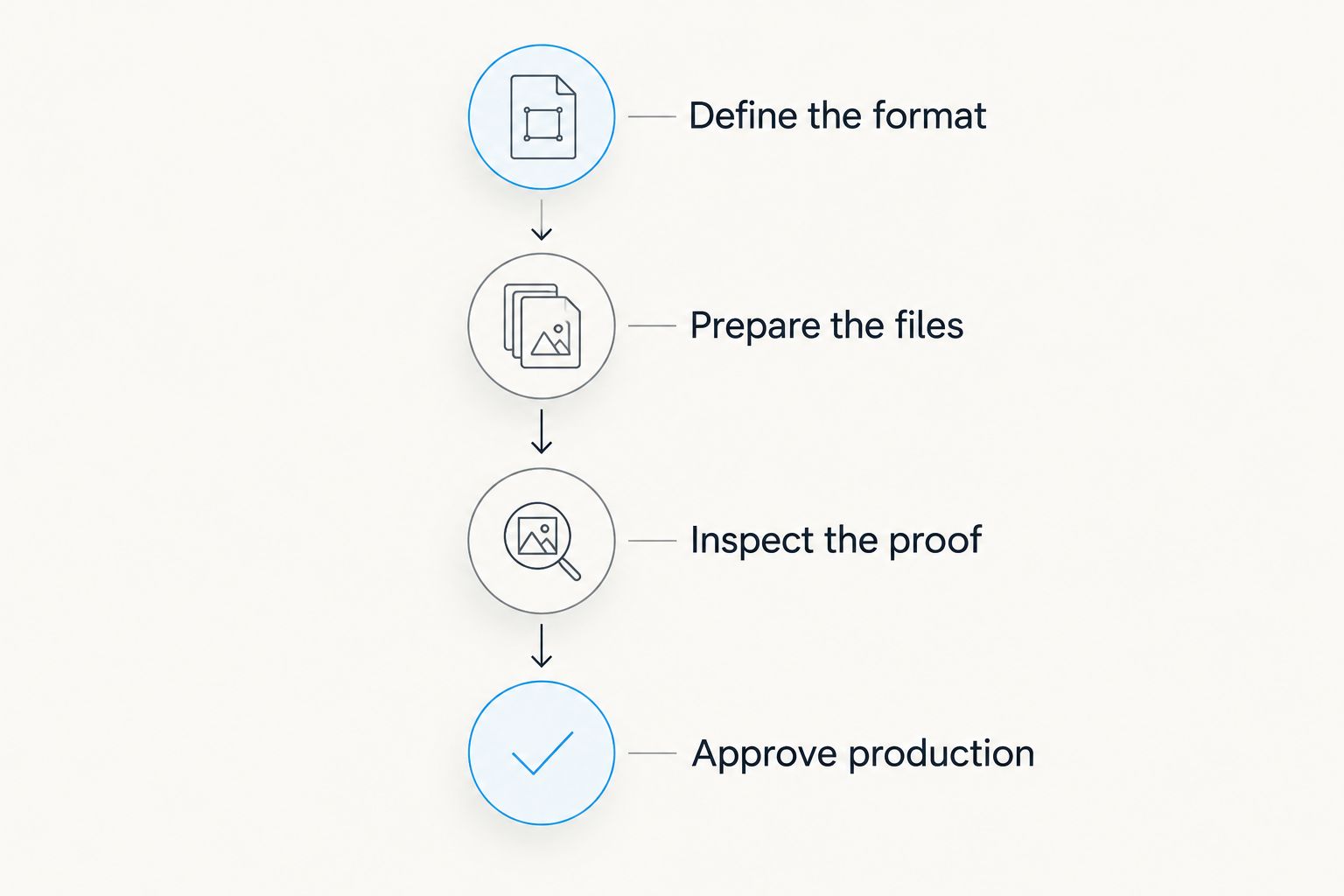
Your 2026 shortlist should end with a production check, not a feature-count contest. Use the same sequence for every provider so you can distinguish a file problem from a production mismatch.
Define the format
Write down the intended trim size, binding, page count, and interior treatment. A 6 × 9-inch book is a useful example of a common text-book format, but do not assume every provider supports every combination of size and binding.
Changing trim size changes pagination. Finish that decision before treating page count or cover dimensions as final.
Prepare the files
Use the chosen provider's current templates and export requirements. Cover geometry depends on the selected production specifications, so a cover prepared for one setup is not automatically ready for another.
For photographic images, 300 pixels per inch at final printed size is a common preparation target. Enlarging a small image does not restore detail that the original file lacks.
Inspect the proof
Review a PDF at 100% scale for type size, spacing, and obvious layout problems, then inspect a physical proof before approving production. The screen check and the printed check answer different questions.
Examine the gutter, small text, image cropping, page order, and cover alignment. Mark corrections in a single master file so you do not accidentally submit an older version.
Approve production
Confirm the final files and production specifications together. If you change paper, binding, page count, or trim after approval, recheck the cover and interior rather than assuming the previous approval still applies.
Keep the approved files clearly named and separate from working drafts. That simple distinction makes later corrections easier to control.
How these options are ranked
This 2026 guide ranks by publishing fit: sales channel, production requirements, inventory responsibility, proof control, fulfillment, and file portability. It does not assign print-quality scores or claim that one company's output has been tested against another's.
Amazon KDP takes the default position for an Amazon-first author. IngramSpark, direct-print evaluation, Lulu Direct, and Blurb each solve a different problem. Moving an option higher without changing the author's requirements would make the ranking less useful.
Which book printing company should you choose?
Choose Amazon KDP if you are undecided and your first objective is selling a conventional print book on Amazon. Choose IngramSpark when trade distribution supports a bookstore or library outreach plan.
For direct sales, decide whether you want to manage copies yourself or connect production to your online store. Evaluate a direct-print proposal for the former; examine Lulu Direct for the latter. Put Blurb on the shortlist when photography and page design define the project.
Do not add another provider just to make the publishing setup look complete. Add one only when it handles a sales route or production requirement your current arrangement does not cover.
FAQ
What’s the best book printing company for a first-time self-published author?
Amazon KDP is the best default when your first sales channel is Amazon. Choose a different route if trade distribution, direct fulfillment, or a visual-book workflow is the main requirement.
Is IngramSpark better than Amazon KDP?
IngramSpark is the stronger fit for authors seeking trade distribution, while Amazon KDP fits an Amazon-first launch. Neither choice guarantees sales or bookstore placement.
Should I use print on demand or order copies myself?
Use print on demand when you want production tied to individual orders; evaluate a direct-print order when you plan to manage physical copies. Decide who will store, pack, and send the books before selecting a provider.
Can I sell printed books through my own website?
Yes, you can sell printed books through your own website. Lulu Direct connects supported storefronts with print fulfillment, while another approach is to manage copies and shipping yourself.
Which option should I consider for a photography book?
Blurb belongs on a photography-book shortlist because it offers visual bookmaking tools including BookWright. Inspect a printed proof for cropping, tonal detail, and page layout before approving the book.
Do I need a physical proof before publishing?
Inspect a physical proof before approving your book for production. A PDF cannot show you the finished binding, paper feel, or printed appearance of photographs.
Can I send the same book files to every printing company?
Do not assume the same files meet every printing company’s requirements. Check trim size, bleed, binding, paper selection, and cover geometry against each provider’s current specifications.
One last thing
Keep a demanding proof spread, not just an attractive one. Include small text, a dark photograph, a caption, and content close to the gutter if your manuscript uses them. For your 2026 publishing decision, that spread gives you a repeatable way to inspect the details most likely to disappoint a reader.


